Author: Drew Monroe

  • How to Build an AI Workspace for your Small Business

    Here’s What I Learned Before Connecting It.

    I started looking into building an AI workspace because I wanted one place to manage the work I’m doing for RoeMark and my clients. I wanted to keep each client’s projects separate, with their business context available when I needed it. And I wanted to be able to switch between ChatGPT and Claude without feeling like I was starting over.

    That became the idea behind an AI workspace for RoeMark.

    I love the build, so I started working on a prototype to see what that could look like. Then I got to the part about connecting the models and realized I hadn’t fully understood the setup. Having a ChatGPT or Claude subscription doesn’t automatically mean you can plug that subscription into your own application and keep using it the same way.

    API access has its own setup and billing. That gave me pause because I didn’t yet have a good way to estimate what the workspace would cost at my current usage.

    For now, I’m keeping the workspace as a proof of concept and something I can write about as I learn. I still see potential in it. But before I put more into the build, I want to understand whether it makes sense for how I actually work. If you’re considering something similar for your business, that’s a useful place to start.

    What is an AI workspace?

    In my case, the idea is a central place where I can work on marketing tasks with the right business context already available.

    Think about what happens when you ask AI to write something for your small business. You explain what you do and who you’re trying to reach. You give it some background on how you want to sound. Then you read the draft and realize it’s stripped out the words and personality you wanted to keep. So you spend more time explaining that part, too.

    Having to repeat that context is part of what I wanted to solve.

    An AI workspace could keep that information with the client’s projects, so I’m working from the same background each time. For RoeMark, I pictured a client area where I could select a task, like drafting a blog outline, and use the information I’d already gathered about that business. I also wanted the option to choose which model to use within that same interface.

    To make that work, I’d need to decide what gets stored and how the workspace supplies the relevant information to the model. Just putting a client folder on the screen doesn’t mean everything inside it will be remembered or used in the next conversation.

    What could an AI Workspace do for a small business?
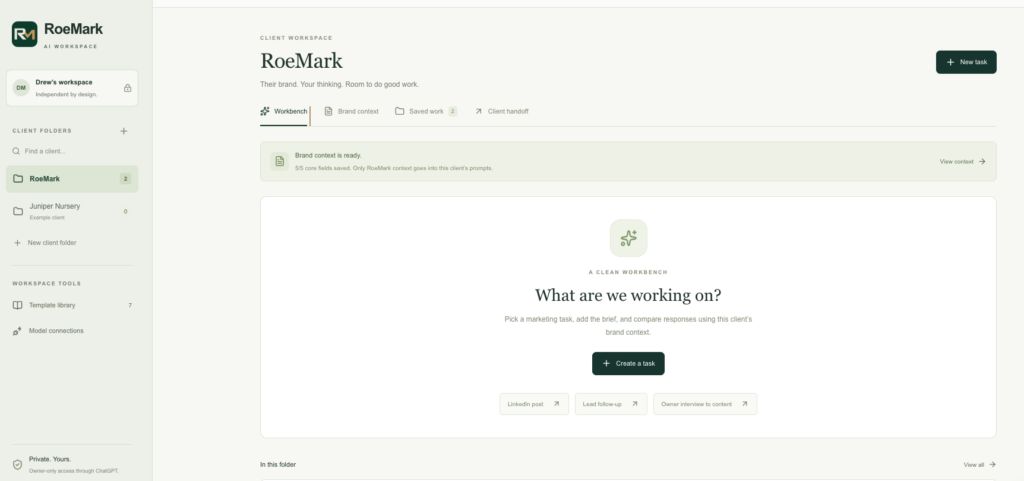
    RoeMark AI workspace for small businesses
    RoeMark’s AI workspace proof of concept for small businesses

    The use case I keep coming back to is turning an owner interview into useful marketing content.

    An owner has a lot of knowledge about the business that never makes it onto the website. They’re answering customer questions every day, but finding time to sit down and turn those conversations into an article is another matter. That’s the kind of work I’d want the workspace to help move along.

    Imagine a garden nursery owner talking through the questions customers ask about choosing plants for a shady yard. With permission to record and an approved transcript, a workspace could help draft a blog outline based on that conversation. The owner could review the direction before anyone spends time writing the full piece.

    That same source material could support a newsletter later. The business knowledge stays connected to the work instead of getting lost in someone’s notes.

    Other tasks I’d consider include:

    • Drafting a blog outline. Start with a customer question, a target audience and an approved source. Ask for a useful structure before generating a whole article.
    • Preparing a customer interview. Build questions around what the business needs to learn, then organize the findings after the conversation.
    • Writing a first response to an inquiry. Use approved service information to prepare a reply for the owner to review.
    • Checking a draft against the business’s voice. Flag generic language and unsupported claims while preserving the person behind the writing.

    These are workflows I’d want to build toward. My prototype is still a proof of concept, and each task would need its own inputs and review process. For example, preparing a response to an inquiry would also require connecting the workspace to wherever that inquiry arrives.

    For me, the value would be in getting useful work completed with less time spent explaining the business from scratch.

    Walk before you run: where AI agents fit in the equation

    It’s easy to start thinking about agents once you see what a workspace could do. But I’d want to walk before I run. First, I need to understand which tasks I’m repeating and where AI is actually saving me time.

    The workspace is where I’d organize the client context and work with AI. An agent could live inside that workspace and take on a defined job, with some ability to decide how to complete it. Agents can also run outside a workspace, but for the RoeMark setup I’m describing, they’d be a more advanced use case within it.

    There’s a distinction worth understanding here. A button that sends a saved prompt to a model is a reusable task. A workflow follows a sequence you’ve defined. An agent can choose some of its next steps based on what it finds, within the access and limits you give it.

    For example, I could start by using the workspace to draft an outline from an owner interview. I’d review it myself and work out what instructions consistently produce something useful. If that becomes a recurring job, I might later give an agent access to the client’s approved content so it can check for overlap and decide which supporting material to consult before proposing an outline for my review.

    I’d only build that once I could explain what time it would save. If a saved prompt or a straightforward workflow handles the task well, I’d be comfortable staying there. The extra setup and review still need to be worth it.

    For me, that’s the progression: get comfortable using the workspace and learn which jobs keep coming back. Then consider an agent where giving it more responsibility would make the work easier.

    Here’s how I’d approach the AI workspace setup

    1. Start with one job you repeat

    I’d choose the task before choosing the technology.

    “Help with marketing” is too broad to build around. “Turn an approved owner interview into a blog outline” gives you something specific to test.

    For that interview example, I’d use the transcript as the source and ask for an outline I could review before drafting. I’d try it in an AI tool I already use first. If I’m still changing the instructions every time, I’d want to work through that before building an application around them.

    2. Gather the business context

    For a marketing workspace, I’d start with a short description of the business and its customers. Add a few approved writing examples, along with the facts the AI can rely on.

    The distinctions matter. An old service description shouldn’t quietly become the source for a new offer. A hypothetical example shouldn’t become a customer success story.

    I’d keep the starting material focused enough that it’s easy to review and update. The goal is to give the AI useful context about the business, and someone needs to make sure that context stays current.

    3. Choose how much you need to build

    An organized setup inside an existing AI application may be enough to start. You can test whether consistent instructions and reference material improve the work before taking on custom software.

    If switching between providers in one interface is important, a dedicated workspace becomes more relevant. LibreChat is one example I’ve considered that supports connections to multiple AI providers. Its documentation describes configuring endpoints and storing API keys separately from the interface. I’m not there yet, but it’s good to know it exists as my needs evolve.

    A custom application gives you more control over how the workspace works, but it also gives you more to maintain. Building the prototype let me think through how I’d want to use it before committing to the connections and ongoing costs.

    4. Understand the model connection and billing

    An API is how your workspace sends a request to an AI provider and receives a response. An API key authorizes that access.

    For an OpenAI connection, you need API platform access and an available balance or billing arrangement. Anthropic has its own Console setup for Claude API access. The application needs a secure way to use those credentials.

    Here’s the part I’d put much earlier in the planning process next time: chat subscriptions and API billing are separate. Some eligible plans offer API credits, so check your actual account benefits before assuming you need to purchase more. Those benefits don’t remove the need to configure API access.

    This is where I needed to rethink my approach. I couldn’t estimate the running cost from what I was already paying for a subscription. Before using the workspace regularly, I’d want to test a small batch of the work I actually do and look at the usage costs.

    5. Decide what the AI workspace remembers

    Switching models doesn’t automatically transfer everything one model knows about your business to another.

    The workspace needs a defined way to supply the relevant instructions and source material. In a simple version, that might mean including an approved client brief with each request. A more involved version might retrieve selected information from a larger collection of documents.

    For client work, separate folders are only part of the design. Access controls and retrieval rules need to keep each client’s information within the right workspace.

    I’d test that directly. Ask a question that should be answered from one client’s material and check what the application actually sends and returns.

    6. Run a small pilot

    Start with one workflow and a manageable set of approved material. Review the output closely, including where it gets facts wrong or loses the owner’s voice.

    I’d track the time spent correcting the work as well as the time spent generating it, alongside the API usage and any software or hosting costs. If I’m spending an hour putting my words and personality back into a draft, that needs to count when I’m deciding whether the workflow is helping.

    What you’ll need for an AI Workspace

    Before turning a prototype into a working tool, I’d want these pieces in place:

    What you need
    Why it matters

    A specific recurring task

    Gives you a clear way to judge whether the workspace helps.

    Approved business context

    Provides a reliable source for facts and writing direction.

    An interface and somewhere to run it

    Gives people access to the workflow. A custom or self-hosted setup also needs ongoing maintenance.

    Provider access, if using APIs

    Connects the workspace to the models and establishes how usage is paid for.

    Secure credential storage and access controls

    Protects the connection and helps keep client information separated.

    A defined review step

    Makes someone responsible for checking the work before it goes out.

    A pilot budget

    Lets you assess actual costs before expanding usage.

    I’d also check the data policies for every service involved. Running your own interface doesn’t mean the information stays on your own computer. If the application sends a request to an external provider, that provider is part of the data flow.

    Where I landed

    I still want a central AI workspace for RoeMark. Being able to keep client projects separate and switch models with the right context available would be useful in my day-to-day work.

    For now, I’m keeping the prototype as a proof of concept while I get a better handle on the costs and what I’d actually gain from using it. I don’t need to finish the whole build to learn something useful from it.

    If you’re a small business owner considering a similar setup, I’d start with a task you already struggle to find time for. Try the workflow with the tools you have, and pay attention to how much work it takes to get a result you’d use. That will tell you a lot about what’s worth building next.
  • When Was the Last Time You Interviewed Your Customers?

    When Was the Last Time You Interviewed Your Customers?

    You know your products, services and your business. You’ve put a lot of yourself into it, and you probably have a pretty good idea of what makes it worth choosing. But when was the last time you interviewed a customer to find out whether their experience matches what you think you’re delivering?

    For example, earlier in my career, I had the privilege of revisiting our ideal customer profile, or ICP. Who were we best suited to help, and what were those customers actually struggling with? We had a lot of that information already. It was sitting in our internal documents.

    We had a private, secured company license that enabled us to work with documents in our internal SharePoint, including our statements of work, or SOWs. Those documents captured the problems customers had approached us to solve and the work we’d agreed to do after winning their business. Using Copilot, I was able to pull out those pain points, look for common themes, and consolidate them into a more cohesive picture of our ideal customer, grounded in the work we’d actually won.

    Now, that’s a luxury a lot of small businesses don’t have. This was a complex B2B environment, and we could do that work because we’d captured so much of the information in the first place. If you’re running a small business, you may not have a SharePoint full of detailed project documents to work through. Some of what you know about your customers might still be in your head, or scattered across emails.

    But you can go back and gather it. Interviewing customers gives you a way to revisit what brought them to you and understand where the experience could have been better. Then you can put a simple process in place to keep capturing that feedback as you go, without making it another chore for your customers. You don’t need the setup we had to start building a clearer picture of the people you serve.

    I use the word “interviewed” intentionally. You might talk to customers every day, whether you’re checking on an order or working through the details of a project. Those conversations matter, but how often do you get to step back and ask why they chose you in the first place? Or what almost stopped them?

    That’s a different conversation. And it’s one I think more small business owners should make room for.

    My background in journalism helped me develop an ability to identify storylines and ask thoughtful questions, something I’ve carried through more than 15 years in marketing. What interests me is what happens after the first answer, when you ask a follow-up and begin to understand what someone actually means.

    A customer tells you the project went well. Great. But what made it go well? Was there a moment when they felt confident they’d chosen the right company? Was there something they had to figure out themselves that you could have made easier?

    That’s where the conversation starts to become useful. Customer interviews for small businesses don’t have to be elaborate, but they do deserve more intention than a quick “Everything good?” on your way to the next thing.

    You’re close to the business. Your customer sees it differently.

    When you’re too close to the fire, some things are apparent while others lurk in shadows. I think running a business can feel that way. You’re close enough to see details nobody else sees, but that doesn’t mean you can see the whole experience from where you’re standing.

    You know why a service costs what it does, why certain products take time, or what happens after someone submits a form. You might assume a customer understands those things, too, because they’re so familiar to you.

    Meanwhile, that customer could be sitting on the other side wondering what’s taking so long.

    Or the opposite might be happening. Something you consider a normal part of doing business could be the very reason people choose you. You take the time to advise them through a decision, and to you, that’s just doing your job. To them, it might be the thing they couldn’t find anywhere else.

    If that never comes up in conversation, you might keep burying the good stuff at the back of the store or the bottom of your website when it deserves a much bigger role.

    In marketing, this is part of the overall voice of the customer (VoC). The term can sound more complicated than the idea behind it: understanding how people experience your business, in their own words, and using what you learn to make better decisions.

    Start with one conversation

    I know. You’re running a business, so finding time for coffee with a customer might rank somewhere below answering the emails you’ve already ignored twice and the thousand other tasks that you swear provide more value.

    I’m not suggesting you interview every customer or put the business on hold while you conduct a research project. Start with one person and ask for 15 minutes. Choose someone who recently bought from you or worked with you, while the details are still fresh enough to talk about. Or, make it a point to try to document those golden nuggets you hear as you go about your day.

    A customer you know well can be a comfortable place to start. Just don’t stop there. Eventually, you’ll want to hear from someone who didn’t buy or hasn’t come back. The people who already love you can tell you something valuable, but they won’t tell you everything you need to hear.

    Make the invitation personal. You could say:

    “I’m taking a closer look at what it’s like to work with us, and I’d really value your perspective. Would you have 15 minutes to talk about your recent project? I’d like to hear what worked and anything we could have made easier. No sales pitch. I’m hoping to learn something.”

    Then give them room to say no, or to offer feedback by email if that’s easier.

    With an existing customer, I’d start with a sincere request and respect for their time. Buy the coffee or lunch if you’re meeting in person. If you’re asking for a longer conversation or interviewing people who don’t know you, compensating them for their time may make sense.

    And if you promised it wouldn’t be a sales pitch, keep your word and don’t kill the vibe. Nobody wants to be pitch slapped.

    Give yourself room to listen

    If you’re trying to write down every word, it’s hard to pay attention to where the conversation is going. Recording can help, as long as the customer is comfortable with it and you’ve asked first.

    Keep the request straightforward:

    “Would you mind if I recorded this? I’d like to focus on our conversation instead of trying to take notes the whole time. I’d use it to go back through your feedback afterward. If you’d rather I just take notes, that’s completely fine.”

    If you’re using an AI transcription service, explain that, too. Be clear about what you’ll do with the recording. Agreeing to share feedback doesn’t mean someone has agreed to appear in your next testimonial.

    If they’d prefer not to be recorded, take notes. You’re there to understand their experience, and you can still do that without a transcript.

    Ask a question, then follow the answer

    I’d build the conversation around an actual buying experience. “What do you think of our company?” leaves someone with a lot of ground to cover. Asking what was happening when they first started looking gives them a specific place to begin.

    Here are some questions I’d keep in your arsenal:

    “What was happening that made you start looking?”

    Someone might tell you they were looking for shrubs, but a follow-up reveals they wanted more privacy from the neighboring yard. They weren’t sure what would grow in that spot or how much space they’d need to leave. Now you understand more about what brought them in. They needed help figuring out what would work in their garden before they felt comfortable buying anything.

    “What other options did you consider?”

    Leave room for an answer you weren’t expecting. Your competition might have been another nursery or a big-box retailer, but it could also have been leaving that problem alone for another season. Ask what made moving forward worthwhile.

    “Was there anything that made you hesitate or nearly walk away?”

    This one can be uncomfortable, especially when you’ve put so much work into the business. Give them time to answer. If you immediately explain why something happened, you may never hear the rest of what they were going to say. You can investigate the reason afterward. For now, understand what it felt like from their side.

    “What ultimately made you choose us?”

    You may think you know the answer. Ask anyway. If they say “service,” don’t leave it there. What did someone do that gave them confidence? The specific example is much more useful than the general compliment.

    “After you decided to buy, what could we have made easier?”

    The experience doesn’t end when the sale closes. Maybe the buying process was great, but they had to chase an update afterward. Maybe they weren’t sure who to contact. These are the details you can miss when you only ask whether someone is satisfied overall.

    “What would you tell someone who’s considering working with us?”

    Listen to the language they use. How do they explain what you helped them with? What do they mention first? Their description may be clearer than the one you’ve spent hours trying to write yourself.

    You don’t need to get through every question. If an answer opens up something worth exploring, follow it. “Can you give me an example?” is one of my favorites and is sometimes better than the next question your had queued up.

    Before you wrap up, tell them what you think you heard and ask whether you’ve understood correctly. It gives them a chance to clarify, and gives you a chance to catch an assumption before it becomes an action item.

    Do something with what you hear

    Here’s a hypothetical garden nursery example. A customer says, “I liked the shrub, but I wasn’t sure it would work in my garden.”

    You could hear that as a request for a better plant label. But spend a little more time with it. Were they unsure how much sun that spot received? Did they understand how big the shrub would get? While walking around the nursery, could they find someone to ask, or did they leave with the question still in their head?

    Those answers point to different improvements. Clearer signs might help someone narrow down their choices. You might need to make it easier to find staff, or let customers know they can bring a photo of their garden for advice, if that’s help you offer. Rewriting the website won’t help much if someone still walks around the nursery unsure who to ask.

    Now imagine another customer says, “You took the time to help me choose something that would actually grow in my garden.” To you, that might just be part of running a nursery. To them, it might be why they chose you over the garden center down the road. If that’s support you consistently provide, are you making it visible on your website and when people arrive?

    This is the part that interests me as a marketer. A conversation can uncover language for your website, but it can also reveal something about how the business operates. I wouldn’t want to reduce all that to a better headline and call it done.

    Keep the customer’s words in the picture

    Bring your notes into one working document. Keep the customer’s actual words alongside your interpretation so you can go back and check what was said. A spreadsheet is enough to start, with room to record a possible improvement and who’s going to follow up.

    As you have more conversations, look for themes. If several people describe the same confusion, that’s something to investigate. If one person makes an unexpected observation, keep it visible without assuming it represents every customer you serve.

    An AI tool can help organize de-identified feedback, but I’d still go back to the original comments. A tidy summary can lose the detail that made an answer useful in the first place.

    You can also keep listening between interviews. Add a question to a follow-up email: “What could we have made easier?” If you have employees who work with customers, give them somewhere to capture what they’re hearing. Set aside time each month to review it and decide what deserves attention.

    Then close the loop when you make a change. “You mentioned it was hard to find someone to ask about plants. Here’s what we’ve changed.” That’s a much more meaningful response than letting someone’s feedback disappear into a document nobody opens again.

    Free tools to help you get started

    Start with what you already have. You don’t need another subscription before you can ask a useful question

    • iPhone Voice Memos: An option for recording in-person conversations with permission. Transcription depends on device and language support. Apple’s transcription guidance.
    • Otter.ai: A recording and transcription option for interviews. Check the current plan limits, especially recording length and file imports. Otter plans.
    • Your meeting platform: Check whether your Zoom, Teams, or Google Meet account offers saved transcription. Availability depends on the service, subscription, and settings. Test before the interview; live captions alone don’t establish that you’ll receive a saved transcript.
    • Google Forms or Microsoft Forms: Useful for short written surveys. Responses can be collected in or exported to a spreadsheet. Google Forms / Microsoft Forms.
    • Airtable: Another form-building option. It has a free tier option for small businesses.
    • Google Sheets or Excel: Keep the customer’s words alongside the issue, proposed action, person responsible, and follow-up date.

    Let what you learn inform where you go next

    Over time, these conversations can help shape how you describe your business and what you choose to emphasize. They can also inform a brand manifesto, giving you a way to compare what you say you stand for with what customers actually experience.

    That doesn’t mean changing direction every time someone has an opinion. Your values are still your values. But it’s worth being open to the possibility that customers see a strength you’ve overlooked, or that something you intended to deliver isn’t coming through the way you hoped.

    That’s why I see this as an ongoing part of running a business. What mattered to customers when you started may still matter today, but their circumstances can change. Continuing to have these conversations gives you a way to understand those changes instead of guessing at them.

    Start with one customer this month. Give yourself time to hear the answer, especially if it’s different from the one you expected. Then decide what you’re going to do with it.

    If you’d like someone to help conduct those interviews and work through what they mean for your business, that’s something I can support through RoeMark. I work with small businesses in the Portland area and throughout the Pacific Northwest, bringing my journalism background and marketing experience to that conversation.