Here’s What I Learned Before Connecting It.
I started looking into building an AI workspace because I wanted one place to manage the work I’m doing for RoeMark and my clients. I wanted to keep each client’s projects separate, with their business context available when I needed it. And I wanted to be able to switch between ChatGPT and Claude without feeling like I was starting over.
That became the idea behind an AI workspace for RoeMark.
I love the build, so I started working on a prototype to see what that could look like. Then I got to the part about connecting the models and realized I hadn’t fully understood the setup. Having a ChatGPT or Claude subscription doesn’t automatically mean you can plug that subscription into your own application and keep using it the same way.
API access has its own setup and billing. That gave me pause because I didn’t yet have a good way to estimate what the workspace would cost at my current usage.
For now, I’m keeping the workspace as a proof of concept and something I can write about as I learn. I still see potential in it. But before I put more into the build, I want to understand whether it makes sense for how I actually work. If you’re considering something similar for your business, that’s a useful place to start.
What is an AI workspace?
In my case, the idea is a central place where I can work on marketing tasks with the right business context already available.
Think about what happens when you ask AI to write something for your small business. You explain what you do and who you’re trying to reach. You give it some background on how you want to sound. Then you read the draft and realize it’s stripped out the words and personality you wanted to keep. So you spend more time explaining that part, too.
Having to repeat that context is part of what I wanted to solve.
An AI workspace could keep that information with the client’s projects, so I’m working from the same background each time. For RoeMark, I pictured a client area where I could select a task, like drafting a blog outline, and use the information I’d already gathered about that business. I also wanted the option to choose which model to use within that same interface.
To make that work, I’d need to decide what gets stored and how the workspace supplies the relevant information to the model. Just putting a client folder on the screen doesn’t mean everything inside it will be remembered or used in the next conversation.
What could an AI Workspace do for a small business?
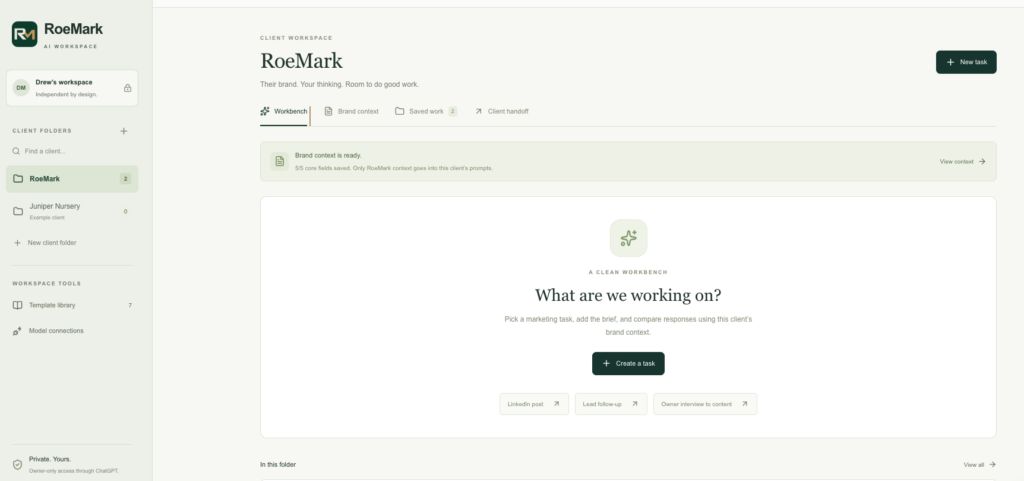
The use case I keep coming back to is turning an owner interview into useful marketing content.
An owner has a lot of knowledge about the business that never makes it onto the website. They’re answering customer questions every day, but finding time to sit down and turn those conversations into an article is another matter. That’s the kind of work I’d want the workspace to help move along.
Imagine a garden nursery owner talking through the questions customers ask about choosing plants for a shady yard. With permission to record and an approved transcript, a workspace could help draft a blog outline based on that conversation. The owner could review the direction before anyone spends time writing the full piece.
That same source material could support a newsletter later. The business knowledge stays connected to the work instead of getting lost in someone’s notes.
Other tasks I’d consider include:
- Drafting a blog outline. Start with a customer question, a target audience and an approved source. Ask for a useful structure before generating a whole article.
- Preparing a customer interview. Build questions around what the business needs to learn, then organize the findings after the conversation.
- Writing a first response to an inquiry. Use approved service information to prepare a reply for the owner to review.
- Checking a draft against the business’s voice. Flag generic language and unsupported claims while preserving the person behind the writing.
These are workflows I’d want to build toward. My prototype is still a proof of concept, and each task would need its own inputs and review process. For example, preparing a response to an inquiry would also require connecting the workspace to wherever that inquiry arrives.
For me, the value would be in getting useful work completed with less time spent explaining the business from scratch.
Walk before you run: where AI agents fit in the equation
It’s easy to start thinking about agents once you see what a workspace could do. But I’d want to walk before I run. First, I need to understand which tasks I’m repeating and where AI is actually saving me time.
The workspace is where I’d organize the client context and work with AI. An agent could live inside that workspace and take on a defined job, with some ability to decide how to complete it. Agents can also run outside a workspace, but for the RoeMark setup I’m describing, they’d be a more advanced use case within it.
There’s a distinction worth understanding here. A button that sends a saved prompt to a model is a reusable task. A workflow follows a sequence you’ve defined. An agent can choose some of its next steps based on what it finds, within the access and limits you give it.
For example, I could start by using the workspace to draft an outline from an owner interview. I’d review it myself and work out what instructions consistently produce something useful. If that becomes a recurring job, I might later give an agent access to the client’s approved content so it can check for overlap and decide which supporting material to consult before proposing an outline for my review.
I’d only build that once I could explain what time it would save. If a saved prompt or a straightforward workflow handles the task well, I’d be comfortable staying there. The extra setup and review still need to be worth it.
For me, that’s the progression: get comfortable using the workspace and learn which jobs keep coming back. Then consider an agent where giving it more responsibility would make the work easier.
Here’s how I’d approach the AI workspace setup
1. Start with one job you repeat
I’d choose the task before choosing the technology.
“Help with marketing” is too broad to build around. “Turn an approved owner interview into a blog outline” gives you something specific to test.
For that interview example, I’d use the transcript as the source and ask for an outline I could review before drafting. I’d try it in an AI tool I already use first. If I’m still changing the instructions every time, I’d want to work through that before building an application around them.
2. Gather the business context
For a marketing workspace, I’d start with a short description of the business and its customers. Add a few approved writing examples, along with the facts the AI can rely on.
The distinctions matter. An old service description shouldn’t quietly become the source for a new offer. A hypothetical example shouldn’t become a customer success story.
I’d keep the starting material focused enough that it’s easy to review and update. The goal is to give the AI useful context about the business, and someone needs to make sure that context stays current.
3. Choose how much you need to build
An organized setup inside an existing AI application may be enough to start. You can test whether consistent instructions and reference material improve the work before taking on custom software.
If switching between providers in one interface is important, a dedicated workspace becomes more relevant. LibreChat is one example I’ve considered that supports connections to multiple AI providers. Its documentation describes configuring endpoints and storing API keys separately from the interface. I’m not there yet, but it’s good to know it exists as my needs evolve.
A custom application gives you more control over how the workspace works, but it also gives you more to maintain. Building the prototype let me think through how I’d want to use it before committing to the connections and ongoing costs.
4. Understand the model connection and billing
An API is how your workspace sends a request to an AI provider and receives a response. An API key authorizes that access.
For an OpenAI connection, you need API platform access and an available balance or billing arrangement. Anthropic has its own Console setup for Claude API access. The application needs a secure way to use those credentials.
Here’s the part I’d put much earlier in the planning process next time: chat subscriptions and API billing are separate. Some eligible plans offer API credits, so check your actual account benefits before assuming you need to purchase more. Those benefits don’t remove the need to configure API access.
This is where I needed to rethink my approach. I couldn’t estimate the running cost from what I was already paying for a subscription. Before using the workspace regularly, I’d want to test a small batch of the work I actually do and look at the usage costs.
5. Decide what the AI workspace remembers
Switching models doesn’t automatically transfer everything one model knows about your business to another.
The workspace needs a defined way to supply the relevant instructions and source material. In a simple version, that might mean including an approved client brief with each request. A more involved version might retrieve selected information from a larger collection of documents.
For client work, separate folders are only part of the design. Access controls and retrieval rules need to keep each client’s information within the right workspace.
I’d test that directly. Ask a question that should be answered from one client’s material and check what the application actually sends and returns.
6. Run a small pilot
Start with one workflow and a manageable set of approved material. Review the output closely, including where it gets facts wrong or loses the owner’s voice.
I’d track the time spent correcting the work as well as the time spent generating it, alongside the API usage and any software or hosting costs. If I’m spending an hour putting my words and personality back into a draft, that needs to count when I’m deciding whether the workflow is helping.
What you’ll need for an AI Workspace
Before turning a prototype into a working tool, I’d want these pieces in place:
What you need |
Why it matters |
|---|---|
|
A specific recurring task |
Gives you a clear way to judge whether the workspace helps. |
|
Approved business context |
Provides a reliable source for facts and writing direction. |
|
An interface and somewhere to run it |
Gives people access to the workflow. A custom or self-hosted setup also needs ongoing maintenance. |
|
Provider access, if using APIs |
Connects the workspace to the models and establishes how usage is paid for. |
|
Secure credential storage and access controls |
Protects the connection and helps keep client information separated. |
|
A defined review step |
Makes someone responsible for checking the work before it goes out. |
|
A pilot budget |
Lets you assess actual costs before expanding usage. |
I’d also check the data policies for every service involved. Running your own interface doesn’t mean the information stays on your own computer. If the application sends a request to an external provider, that provider is part of the data flow.
Where I landed
I still want a central AI workspace for RoeMark. Being able to keep client projects separate and switch models with the right context available would be useful in my day-to-day work.
For now, I’m keeping the prototype as a proof of concept while I get a better handle on the costs and what I’d actually gain from using it. I don’t need to finish the whole build to learn something useful from it.
If you’re a small business owner considering a similar setup, I’d start with a task you already struggle to find time for. Try the workflow with the tools you have, and pay attention to how much work it takes to get a result you’d use. That will tell you a lot about what’s worth building next.